Maximizing Your Projects with the Spring Bloom Laser Cut File SVG Bundle
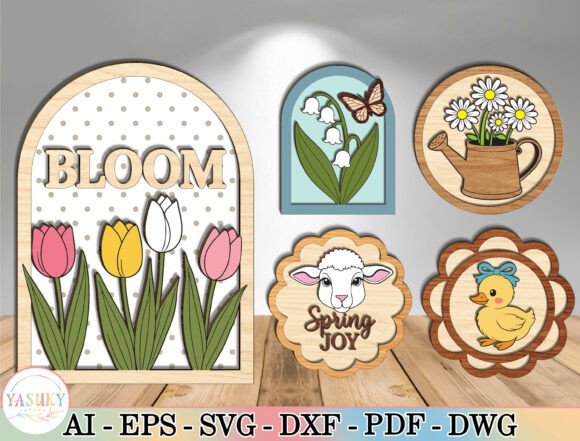
There is a distinct satisfaction in watching a laser cutter bring a digital design to life, especially when that design captures the renewal of the season. The Spring Bloom Laser Cut File SVG Bundle offers a curated collection of five unique designs, ranging from the layered "Bloom" tulip arch to the rustic daisy watering can. However, owning high-quality files is only half the battle. Many creators, from hobbyists to small business owners, stumble not because of the design quality, but due to overlooked details in material selection, layer alignment, and file preparation. Understanding these nuances is essential for transforming a good cut into a professional-grade finished product.
When you download a bundle like this, the immediate temptation is to send the file straight to your machine. This is often the first mistake. While the included files are optimized with clean vector paths, assuming they will work perfectly on every machine setting without adjustment can lead to wasted materials. Each design in this collection, such as the Lily of the Valley Arch or the Duckling Flower Frame, relies on a multi-layered style to create depth. If you do not account for the kerf (the width of material removed by the laser) or the specific thickness of your wood or acrylic, your layers may not fit together snugly. A gap of even a millimeter can ruin the 3D effect that makes these designs stand out.
Avoiding Assembly Pitfalls in Multi-Layer Designs
The charm of the Spring Bloom Laser Cut File SVG Bundle lies in its dimensionality. The Spring Joy Lamb Sign and the Bloom Tulip Arch are not flat images; they are constructed pieces. A common misunderstanding among beginners is treating these as single-cut projects. When layers are cut from different materials or even different batches of the same wood, slight variations in thickness can occur. If you force the pieces together, you risk cracking the material or causing the structure to warp over time.
To avoid this, always perform a test cut on a scrap piece of your intended material before committing to your final stock. Check the fit of the tabs and slots. If the fit is too tight, you may need to offset your vectors slightly in your design software. If it is too loose, consider using a high-quality wood glue to secure the layers rather than relying solely on friction. For the Daisy Watering Can Round, which features a circular frame, ensuring concentric alignment is critical. Misalignment here is immediately visible and detracts from the cheerful aesthetic. Take the time to dry-fit your layers before applying any adhesive.
Material Selection and Finish Quality
Another area where creators often miss the mark is material choice. The natural elegance of the Lily of the Valley Arch with its butterfly accent calls for a material that complements its soft lines. Using a dark, heavy plywood might overpower the delicate floral details, while a very thin birch might lack the structural integrity needed for a freestanding tabletop display. Conversely, the Duckling Flower Frame with its bow detail might look whimsical in painted MDF but could lose its charm if the paint fills in the fine engraving lines.
Consider the end use of your project. If you are creating seasonal gifts for sale, durability is key. Hardwoods like maple or cherry offer a premium feel and hold up well over time, making them ideal for the Spring Joy Lamb Sign. If you are making decor for a single season or a photoshoot, lighter woods or even high-quality cardstock for paper crafting can be effective and cost-efficient. Always sand your edges lightly after cutting to remove any char marks, especially on light-colored woods where burn marks are more noticeable. This simple step elevates the presentation from "homemade" to "handcrafted."
Optimizing for Different Machines and Software
While the files in this bundle are delivered as clean vectors, compatibility issues can still arise depending on your workflow. Some users import SVGs directly into their laser software without checking for open paths or duplicate lines. This can cause the laser head to trace the same line twice, resulting in deeper burns or uneven cuts. Before cutting the Bloom Tulip Arch text or the intricate petals of the lily, open the file in your vector editing software (such as Illustrator, Inkscape, or CorelDRAW) and run a "path cleanup" function.
Additionally, ensure that your color mapping corresponds correctly to your machine's power and speed settings. The multi-layered nature of these designs means you might be cutting different depths or engraving specific details. Assigning the wrong setting to the fine details of the Duckling Flower Frame could result in losing the definition of the duck's bow. It is better to spend ten minutes reviewing your job setup than to ruin a sheet of expensive material. Remember, the efficiency of your production depends on this pre-flight check.
Scaling and Customization Considerations
One of the greatest advantages of digital files is the ability to resize, but this freedom comes with responsibilities. The Spring Bloom Laser Cut File SVG Bundle is designed with specific proportions in mind. Drastically resizing the Daisy Watering Can Round to fit a tiny keychain or a massive wall hanging can compromise the structural integrity of the connecting points. Thin stems or small tabs may become too fragile to survive the cutting process or handling if scaled down too far.
If you need to adjust the size significantly, inspect the thickness of the connecting elements. You may need to manually thicken certain lines in your vector software to ensure they remain robust. Furthermore, if you plan to personalize these designs, such as adding a name to the Spring Joy Lamb Sign, ensure the font weight matches the existing design elements. A script font that is too thin will look out of place next to the bold, friendly lettering of the original "Spring Joy" text. Consistency in style maintains the professional look of the final piece.
Making the Right Choice for Your Needs
Before finalizing your purchase or starting your next project, evaluate what you truly need from a design bundle. Are you looking for quick, one-off crafts, or are you building a product line for an Easter market? The versatility of this bundle supports both, but your approach should differ. For mass production, focus on optimizing your material layout to minimize waste. Nest the Lily of the Valley Arch and the Bloom Tulip Arch efficiently on your sheet stock. For one-off gifts, focus on premium materials and intricate finishing touches like staining or painting.
Ultimately, the value of the Spring Bloom Laser Cut File SVG Bundle is realized through careful execution. By paying attention to material thickness, testing your fits, cleaning your vectors, and respecting the design's proportions, you ensure that your final creations honor the beauty of the season. Whether you are decorating your own home with tiered trays or fulfilling orders for customers, these practical steps will help you avoid common frustrations and deliver results that truly bloom.