Elevating Your Paper Crafts with a Butterfly Paper Cut Layered Bookmark SVG
There is a distinct satisfaction in holding a handmade bookmark that feels substantial yet delicate. The trend of 3D layered paper art has taken the crafting community by storm, and for good reason. These projects transform flat sheets of cardstock into dimensional masterpieces that catch the light and add texture to your reading experience. At the heart of many successful projects lies a high-quality Butterfly Paper Cut Layered Bookmark SVG. However, diving into digital cut files without understanding the nuances of resolution, file formats, and layering logic can lead to frustration rather than the beautiful result you envisioned.
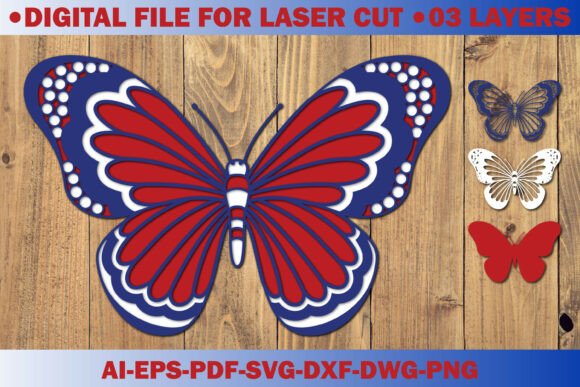
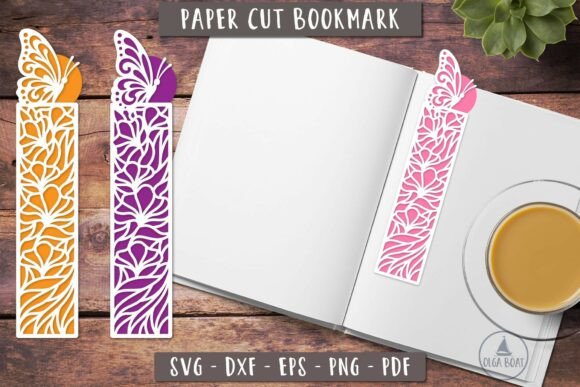
When you search for the perfect design, you are likely looking for more than just an image; you need a functional blueprint. A true layered file allows you to cut multiple shades of the same color or contrasting hues to create depth. The specific package described here offers a comprehensive suite of tools: one EPS 10 file, two PNG files, two PDF files, one DXF file, and two SVG files, all packed securely in a ZIP archive. While having access to this variety is excellent, knowing which file to use for your specific machine is where many crafters stumble.
Navigating File Formats and Machine Compatibility
One of the most common misunderstandings beginners face is assuming all vector files work identically on every cutting machine. You might purchase a premium Butterfly template perfect for a paper cut bookmarks, only to find your Cricut or Silhouette struggling to read the data. This often happens when users attempt to upload raster images like PNGs directly into vector-based software without tracing them first, resulting in jagged edges and lost detail.
To avoid this, always prioritize the vector formats included in your download. The SVG files are generally the gold standard for Cricut Design Space, while DXF files often perform better on older Silhouette models or specialized industrial cutters. The EPS 10 file is your go-to if you are using professional design software like Adobe Illustrator before sending the job to a cutter. By selecting the correct format from the start, you ensure that the intricate details of the butterfly wings remain crisp and that the software recognizes each layer as a separate cut path.
Furthermore, do not overlook the PDF files included in the set. These are invaluable if you do not own a digital cutting machine. You can print these directly onto high-quality cardstock and use a precision craft knife to achieve the same layered effect manually. Ignoring these non-digital options limits your versatility, especially if you are teaching a workshop where participants may not have access to expensive hardware.
The Critical Importance of Resolution and Sizing
Another area where quality can degrade rapidly is in the handling of image resolution and sizing. The files provided in this collection boast a 3d bookmarks layered file resolution 300 dpi, which is the industry standard for sharp printing. However, a frequent mistake occurs when users resize these files disproportionately. If you stretch a design to fit a larger project without maintaining the aspect ratio, the butterfly will look distorted, and the delicate connections between wing segments may become too thin to cut or weed effectively.
The specification notes that the design is 9'' along the long side. This is a generous size for a bookmark, offering ample space for detailed layering. Yet, some crafters mistakenly believe they can scale this down indefinitely for miniature projects. When you shrink a complex layered design too small, the negative space between layers disappears, causing the pieces to fuse together during cutting or making it impossible to assemble the 3D structure. Always test a single layer on scrap paper at your intended size before committing your best cardstock.
Additionally, be wary of low-resolution previews often found in marketplace listings. Ensure that the actual files you download match the promised 300 DPI. Blurry edges ruin the professional look of a finished product, making it appear amateurish regardless of how well you assemble it. High resolution ensures that when you slice through multiple layers of cardstock, the edges remain clean, allowing the shadows between layers to create that coveted 3D pop.
Material Selection and Assembly Pitfalls
Even with the perfect Butterfly Paper Cut Layered Bookmark SVG, the wrong material choice can sabotage your project. A common error is using standard printer paper for the base layers. Printer paper lacks the structural integrity needed to hold the adhesive and maintain the 3D shape. It curls easily and tears when you try to separate the layers. Instead, opt for cardstock ranging from 65lb to 80lb cover weight. This thickness provides enough rigidity to stand up to the layering process while still being thin enough for most home cutting machines to handle without excessive pressure.
Adhesive application is another step where patience is required. Many crafters rush this stage, applying glue haphazardly. This can cause the layers to shift, misaligning the butterfly's symmetry, or result in visible glue seepage that stains the paper. The better approach is to use fine-tip glue pens or double-sided adhesive sheets specifically designed for paper crafts. Apply adhesive only to the designated "bridge" areas where layers connect, leaving the open spaces free to create depth.
Consider the color theory involved in your layering. A mistake often seen is choosing colors that are too similar. If your base layer is light blue and your top layer is sky blue, the 3D effect will be lost in certain lighting conditions. To maximize the impact of the layered file, choose a gradient that moves from dark to light or utilize contrasting tones to make the butterfly wings appear to lift off the page. This thoughtful selection transforms a simple cut file into a piece of art.
Maximizing Value for Creators and Entrepreneurs
For those looking to turn this hobby into a small business, understanding the licensing and versatility of your files is crucial. The inclusion of multiple file types (EPS, PNG, PDF, DXF, SVG) suggests a product designed for broad usability. However, entrepreneurs must verify the license terms regarding commercial use. Assuming a file is free for unlimited commercial production without checking can lead to legal issues down the line.
If you plan to sell these bookmarks, consistency is key. Using the same Butterfly template across a batch requires precise calibration of your cutting machine. Regularly clean your blades and mats to ensure the first bookmark looks identical to the hundredth. Additionally, consider packaging. A 3D layered bookmark is fragile; selling it without proper protection, such as a stiff backing board or a clear sleeve, can result in damaged goods and unhappy customers.
Educators and workshop leaders can also benefit greatly from these comprehensive file sets. Having both vector and printable PDF options means you can cater to students with varying levels of tech access. You can teach the principles of layering and depth using the printed versions while introducing digital fabrication concepts with the SVG and DXF files. This dual approach makes the Butterfly Paper Cut Layered Bookmark SVG an incredibly versatile teaching tool.
Making the Right Choice for Your Next Project
Before finalizing your decision to download or purchase, take a moment to evaluate your current toolkit. Do you have the appropriate cardstock? Is your cutting mat fresh enough to grip the intricate details of a butterfly wing? Are you comfortable navigating the different file formats provided in the ZIP archive? Answering these questions beforehand saves time and materials.
Remember that the goal is not just to cut paper, but to create something enduring and beautiful. A high-quality 3d bookmarks layered file provides the foundation, but your attention to detail in sizing, material selection, and assembly builds the final masterpiece. By avoiding the common pitfalls of incorrect file usage, improper scaling, and poor material choices, you ensure that every bookmark you create is a testament to your skill and creativity.
Whether you are a seasoned professional looking to expand your product line or a beginner eager to try your first layered project, the right resources make all the difference. Embrace the learning curve, respect the technical specifications like the 300 DPI resolution and 9-inch dimensions, and let your creativity flourish. With the correct approach, these butterfly designs will not just mark pages; they will inspire the readers who hold them.