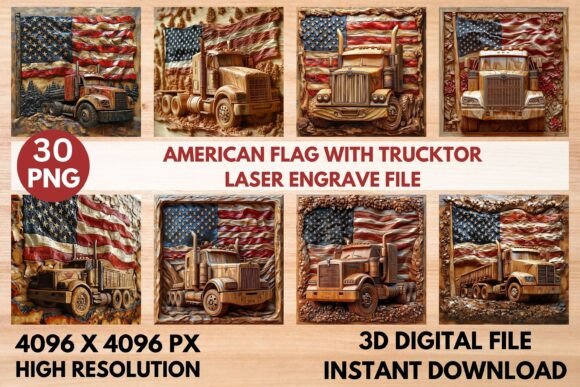
American Flag Trucktor Laser Engrave PNG
Creating patriotic decor that stands out requires more than just a standard clipart image. When you are working with laser engraving machines, the difference between a muddy, burnt mess and a crisp, professional-grade finish often comes down to the quality of your source file. The American Flag with Trucktor Laser Engrav design addresses this specific need by offering a high-resolution, optimized digital asset tailored for precision machinery. This isn't merely a graphic; it is a tool crafted for makers who understand that detail matters. Whether you are running a small Etsy shop, managing a custom signage business, or simply looking to elevate your home workshop projects, having the right file format can save hours of trial and error.
The visual appeal of this design lies in its intricate balance of bold symbolism and fine detail. The American flag is a complex subject to engrave due to the contrast between the stars, stripes, and the field of blue. Standard images often lose definition when translated into the burn patterns of a laser. However, this premium PNG set is engineered to maintain clarity. The "Trucktor" element adds a rugged, industrial aesthetic that pairs perfectly with wood textures, giving the final product a masculine, durable look that resonates well with audiences looking for authentic, handcrafted goods. It bridges the gap between traditional patriotism and modern maker culture.
Optimized for Precision Laser Engraving
One of the most significant hurdles for laser enthusiasts is file compatibility and optimization. Many designers create beautiful vector art that looks stunning on a screen but fails to translate well to physical materials. The American Flag with Trucktor Laser Engrav files are specifically prepared to overcome these challenges. You receive a comprehensive package including 15 coloring PNG files and 15 grayscale PNG files, all at a robust resolution of 4096 x 4096 pixels. This high pixel density ensures that even when you scale the design for larger signs or shrink it for smaller items like coasters or keychains, the edges remain sharp and the details distinct.
The inclusion of both coloring and grayscale options provides flexibility depending on your machine’s capabilities and your desired outcome. Grayscale images are particularly valuable for laser engraving because they allow for variable power output. Darker areas of the image tell the laser to burn deeper and darker, while lighter areas result in a shallower, lighter etch. This creates a photographic, three-dimensional effect that flat black-and-white line art simply cannot achieve. For users of popular devices like Glowforge, xTool, Sculpfun, or CO2 laser cutters, these files are ready to import directly into software such as LightBurn. The transparent background further simplifies the workflow, allowing you to place the design onto any virtual material layout without needing to manually remove white space.
It is important to note that these are non-editable raster images, not layered SVGs or cut files. This distinction is crucial for setting expectations. You are purchasing a design optimized for burning, not cutting. If your project requires vector paths for cutting out shapes, you would need to trace these images in your preferred software. However, for surface engraving, these PNGs are superior because they retain the nuanced tonal variations necessary for high-quality results. Always confirm compatibility with your specific machine and software before starting, as settings can vary widely between diode lasers and CO2 tubes.
Versatile Applications for Makers and Entrepreneurs
The versatility of this design extends far beyond simple wooden plaques. Because the file is high-resolution and versatile, it serves as a foundational asset for a wide range of creative and commercial projects. For home decor enthusiasts, this design is perfect for creating rustic wall art, door hangers, or personalized gifts for veterans and first responders. The rugged aesthetic of the Trucktor style complements reclaimed wood, barn wood, and darker hardwoods like walnut or cherry, which tend to show engraving contrast better than lighter woods like pine or maple.
For small business owners and entrepreneurs, this asset opens up diverse product lines. Consider applying this design to leather goods. Leather responds beautifully to laser engraving, and the grayscale depth of the American Flag with Trucktor Laser Engrav PNG can create a embossed, luxurious look on wallets, journal covers, or patches. In the realm of textiles and apparel, while you cannot laser engrave directly onto fabric in the same way as wood, the high-resolution PNG can be used for sublimation printing or heat transfer designs, allowing you to offer patriotic t-shirts, tote bags, or aprons with a unique, textured visual style.
Packaging and stationery also benefit from this level of detail. If you run a brand that values American craftsmanship, using this design on custom packaging inserts, thank-you cards, or limited-edition product labels can reinforce your brand identity. The professional quality of the engraving-ready file ensures that when you prototype these items, the result looks store-ready rather than homemade. This attention to detail helps build trust with customers who associate high-quality presentation with high-quality products. Furthermore, the design works well for paper crafts, allowing for intricate burns on cardstock for greeting cards or event invitations, adding a tactile dimension that digital printing cannot replicate.
Achieving Professional Results with Recommended Settings
Having the right file is only half the battle; understanding how to use it is equally important. To get the most out of the American Flag with Trucktor Laser Engrav design, following recommended settings is a smart starting point. For Glowforge users, a common baseline might involve setting the speed to 1000 and power to 90 for grayscale images, using the "Vary Power" and "Max Quality" settings. Setting the Lines Per Inch (LPI) to 270 provides a good balance between detail and engraving time, though you may increase this for finer details. It is generally advised to use no masking and to perform a single pass to avoid charring the wood.
If you are using LightBurn, a popular choice for many diode and CO2 laser users, employing the Jarvis dither filter is highly recommended. Dithering converts the grayscale image into a pattern of dots that the laser can interpret, creating the illusion of continuous tone. The Jarvis filter is known for producing smooth gradients and reducing banding, which is essential for capturing the subtle transitions in the flag’s design. Always test on a scrap piece of the same material you intend to use for your final product. Wood varies significantly in density, moisture content, and resin levels, all of which affect how the laser interacts with the surface. Lighter woods often provide the best contrast for these types of detailed engravings, making the dark burns pop against the natural grain.
Remember that resizing is the buyer’s responsibility. While the 4096 x 4096 px resolution offers plenty of room for scaling, enlarging a raster image beyond its original dimensions can lead to pixelation. Always check the preview in your laser software to ensure the image remains crisp at your desired size. By combining these high-quality digital assets with careful machine calibration and material selection, you can consistently produce professional-grade items that stand out in a crowded market. This approach not only enhances the aesthetic value of your creations but also streamlines your production process, allowing you to focus on growing your creative business rather than troubleshooting file issues.